The trick in this format is not the speed. It is that the ball never moves. Every shot puts a neon pickleball in the same spot at the same size, so when the faces flick past at ten per second the ball reads as one continuous object and the people become the thing that changes. Get the ball wrong by a few percent in one frame and the whole reel stutters.
We built ours in three passes over two days: study the reference to the frame, generate the cast from a single master image so the ball can't drift, then let CapCut's EditPilot lay the cuts out. Here is each pass, including the parts that went wrong the first time.
Step 1: Study the reference to the frame
Work out three things before generating anything: the anchor (what stays fixed), the framing, and the cut rhythm.
Save the reference reel first. Paste its link into the Reels downloader and you get the original MP4, not a screen recording; that matters because the next step counts frames, and screen recordings drop and duplicate them.
Then let ffmpeg tell you what it is:
ffprobe -v error -count_frames -show_entries format=duration:stream=width,height,r_frame_rate,nb_read_frames -of compact reel.mp4
Ours was 720×1280 at 30 fps, 302 frames, about 10.1 s.
Look at the composition
A contact sheet of every third frame shows what the reel is actually doing:
ffmpeg -i reel.mp4 -vf "select='lt(n,72)*eq(mod(n,3),1)',scale=144:-1,tile=12x2" -frames:v 1 -vsync vfr cycle.jpg
What we saw: the ball sits dead centre left to right, about 40 to 45 percent down the frame, and about a third of the frame wide. It is tack-sharp while the face behind it is soft. The arm points straight at the lens, so it's heavily foreshortened. Backgrounds vary between a sponsor backdrop, the courts and the concourse.
One lesson here cost us an afternoon: sample every frame or every third frame, not two per second. Our first contact sheet at 2 fps hid the real cut speed and made the cuts look like half a second when they are a tenth.
Find every cut
Scene detection gives you the cut points as frame numbers:
ffmpeg -i reel.mp4 -vf "select='gt(scene,0.2)',metadata=print" -an -f null - 2>&1 \
  | grep -oE "pts_time:[0-9.]+" | cut -d: -f2 | awk '{printf "%d ", $1*30+0.5}'
That produced 89 clips. Laid out, the rhythm is simple:
- Main part, 0.00 to 8.53 s: 21 faces in a fixed order, looped four times. Shots 1 to 15 are 3 frames each (0.1 s), shot 16 is 4 frames, probably an editing quirk, and shots 17 to 21 are 3 frames again. One loop is 64 frames, 2.133 s, so the loops start at 0.00, 2.13, 4.27 and 6.40 s.
- Outro, 8.53 to 9.13 s: four more faces, each fading through a white flash, cutting at frames 256, 258, 263 and 269.
- End card, 9.13 to 10.07 s: a black frame, then the logo. It flickers for about 0.4 s, then holds.
Step 2: Generate the cast from one master frame
Don't generate each person from scratch. The ball would land somewhere different every time. Instead, generate one master frame until the ball is right, then make every other person by editing the master, keeping the ball, the camera and the framing and swapping only the person and the background. Because each edit starts from the same pixels, the ball keeps its exact position and size.
We used Higgsfield for all of it: GPT Image 2.5 for generation and edits, Nano Banana for one surgical fix.
The master frame
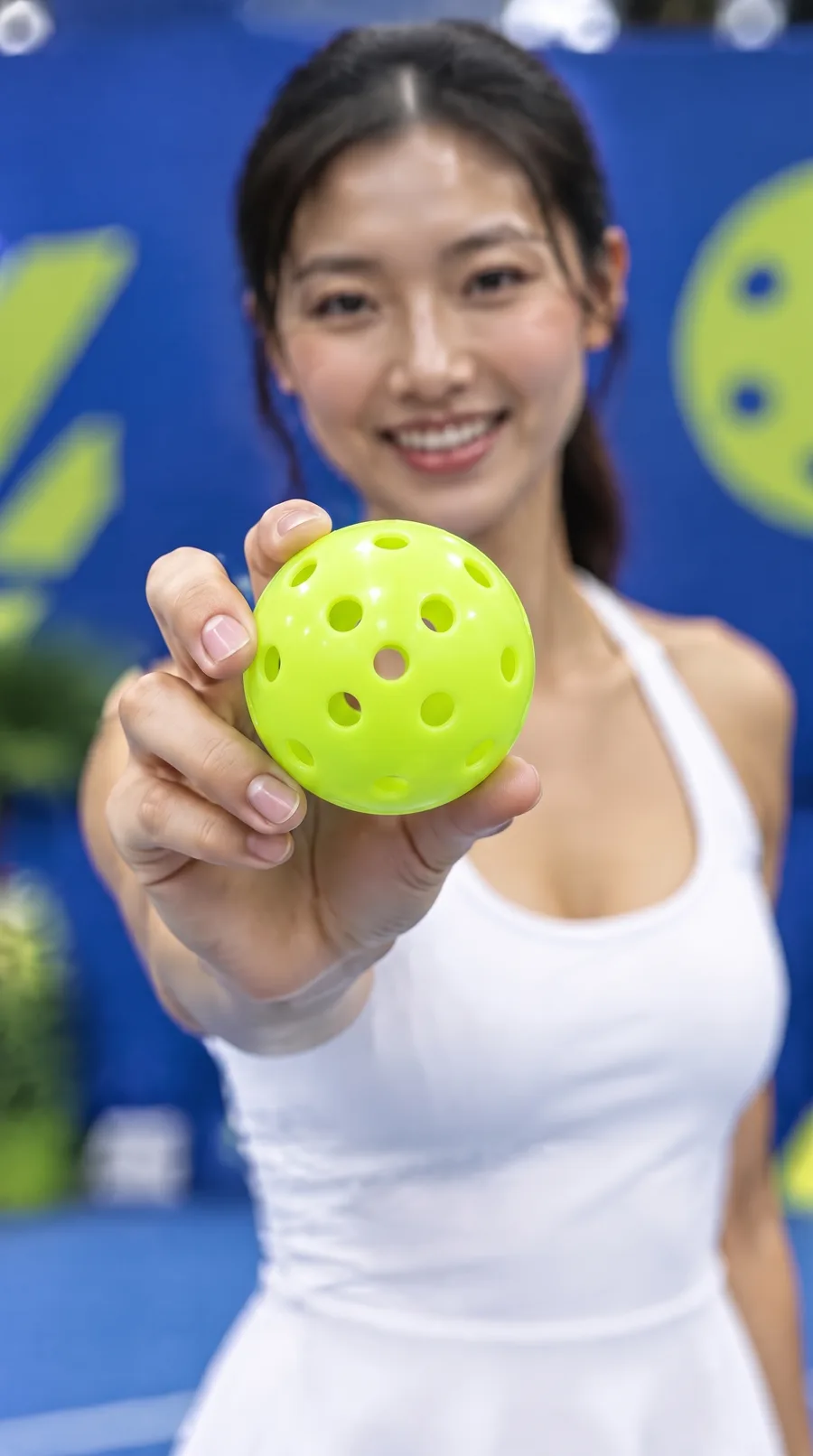
Vertical 9:16 close-up portrait photo, 50mm lens at f/1.4, shallow depth of field,
focus locked on the ball. A woman in her late 20s, East Asian, sleek low ponytail,
white tennis dress, extends her right arm STRAIGHT toward the camera lens (strong
foreshortening, hand very close to the lens) and holds a neon lime-green 40-hole
outdoor pickleball between her thumb and fingertips, presenting it to the viewer.
COMPOSITION IS CRITICAL: the ball sits dead centre horizontally, its centre about
42% down from the top of the frame, and it is LARGE, about one third of the frame
width. Only the ball and fingertips are in sharp focus with crisp round holes; her
face is directly behind and slightly above the ball, clearly out of focus and soft,
smiling warmly at the camera. Head and shoulders framing, face in the upper third.
Background: royal-blue event backdrop with lime-green accents, heavily blurred bokeh.
Bright even indoor sports-hall lighting, candid event photography, photorealistic.
No text, no watermark.
A gentle prompt ("holds the ball toward the camera") gives you a small ball off to one side and a sharp face. You need "arm STRAIGHT toward the lens", "focus locked on the ball", "face clearly out of focus", and the exact size and position, in capitals. The model listens to shouting.
Fix the ball before anything else
Our first master had a ball with melted, crater-like holes that looked like foam, and every edit copied it faithfully. Fix the ball on the master before making a single person. Nano Banana changed only the ball and left the rest of the frame untouched:
Edit this photo. Change ONLY the ball: replace it with a regulation outdoor
pickleball: a smooth, glossy, hard moulded-plastic sphere in neon lime yellow-green,
like a Franklin X-40. It has perfectly round, identical, clean-edged through-holes
(about 8 mm across) drilled in an evenly spaced regular geometric pattern, roughly
15 holes visible from this side; through each hole you can see the hollow, slightly
darker inside of the ball. A faint thin moulding seam runs around its equator.
No dimples, no craters, no bumps, no irregular or melted holes, no foam texture.
Keep the ball in exactly the same position and size, held by the same hand and
fingers, in the same sharp focus. Keep the woman, her face, outfit, pose, framing,
background and lighting exactly as they are. Photorealistic. No text, no watermark.
One prompt per person
Each frame is an edit of the fixed master with two blanks filled in, the person and the background:
Edit this photo. Keep the camera framing, lens, depth of field, and the neon
lime-green pickleball EXACTLY as they are: same ball design, same position (dead
centre, same height), same size, same sharp focus, same lighting on the ball.
Replace the person entirely with: {WHO}. An ordinary everyday Singaporean you would
meet at a local community sports hall, not a model: natural unretouched skin,
realistic features and proportions. They hold the same ball toward the lens with
their own hand. Their face stays behind and above the ball, softly out of focus.
Replace the background with: {BACKGROUND}. Photorealistic candid event photography.
No text, no watermark.
Three backgrounds rotate through the cast: a blurred royal-blue event backdrop with lime graphics, blurred indoor courts with lime lines and a net, and a bright concourse with people out of focus in the distance. The cast itself is twenty lines of description, one per frame, mixed to match who you'd meet at a Singapore community hall: an auntie in her sixties in a sun visor, an uncle with a towel over his shoulder, a teenager with a messy fringe, a mum in a heather-grey tee, a Malay woman in a pastel tudung, a Tamil man in a royal-blue polo, an Eurasian man in a pink one.
Two things we learned the hard way. Generic labels like "East Asian" or "Caucasian" didn't read as Singaporean; naming the communities did. And everyone copies the master's grip, so if you want the hands to vary, add a grip phrase and expect a few retries.
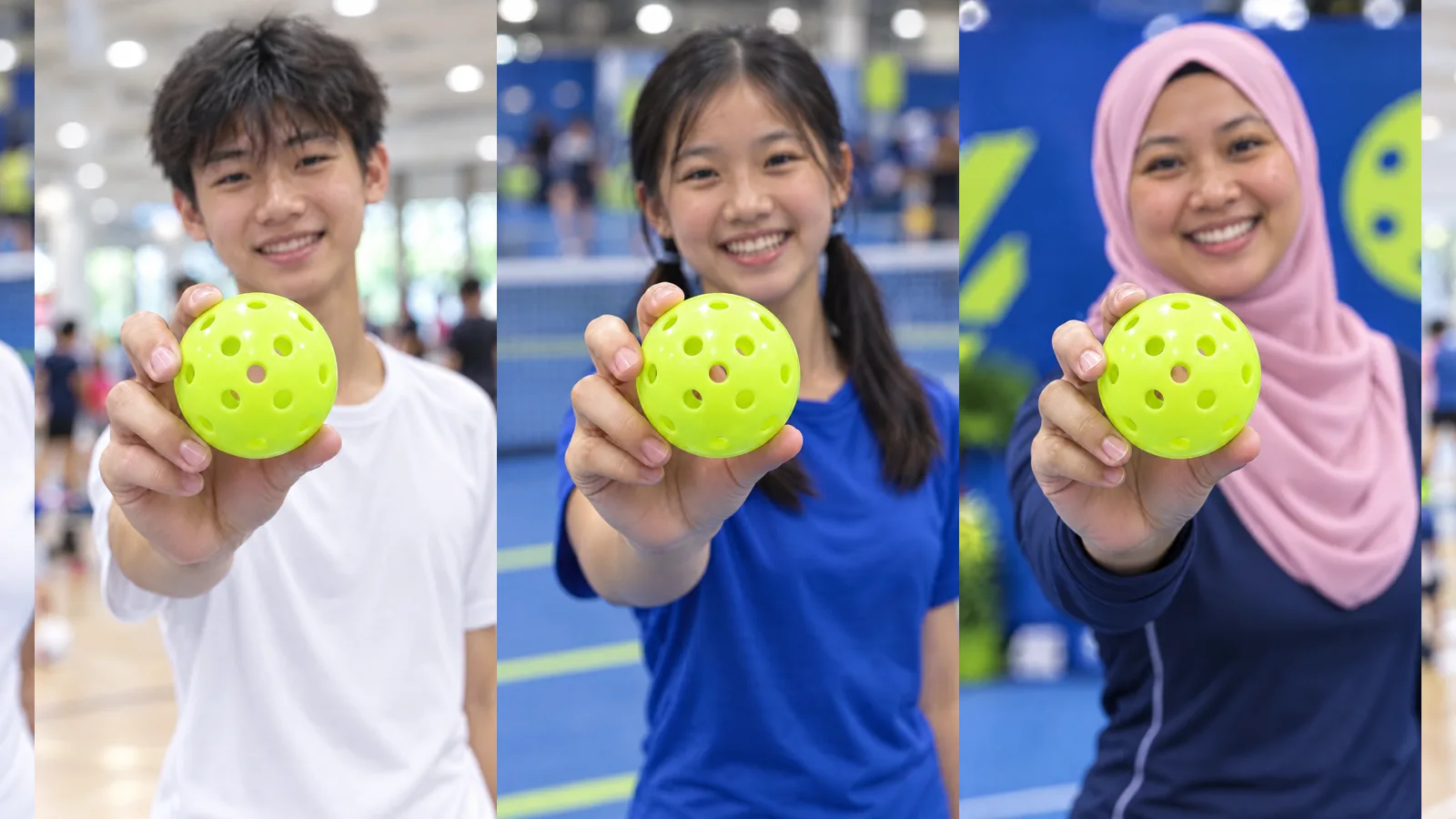
Twenty edits at high quality cost about 2.75 credits each. Run them six at a time from a text file with one line per frame and a retry, because the API occasionally answers with a 503 and a retry fixes it. A clean run of the whole thing is about 60 credits: one master, one ball fix, twenty frames. Our real total was closer to 160 with the experiments and a first set that got thrown away.
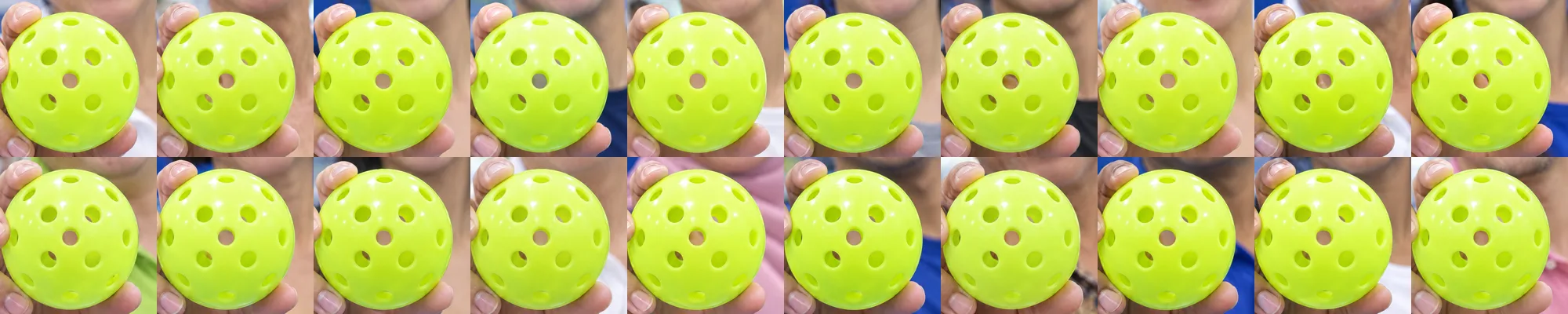
Check the ball before you edit
Crop the ball out of every frame and look at the crops together:
ffmpeg -pattern_type glob -i 'frames/*.png' \
  -vf "crop=iw*0.4:iw*0.4:iw*0.3:ih*0.34,scale=200:200,tile=10x2" ballsheet.jpg
Step 3: Cut it in CapCut with EditPilot
New project at 9:16, 1080×1920, 30 fps. Import the twenty frames, the end card, and your music.
Open EditPilot in the right panel and paste the rhythm:
Build a fast-cut reel from the 20 photos 01.png–20.png in order.
Timing at 30 fps: every photo is 3 frames (0.1 s). Loop the full 01→20 sequence
4 times back to back (about 8.0 s). No transitions between photos — hard cuts only.
Then an outro: 4 more photos (01, 05, 10, 15) at 4 frames (0.133 s) each, each
separated by a 2-frame white flash. Then place end-card-silent.mp4 at the end (about 1.5–2.5 s).
Keep every photo at the same position and scale so the pickleball never moves.
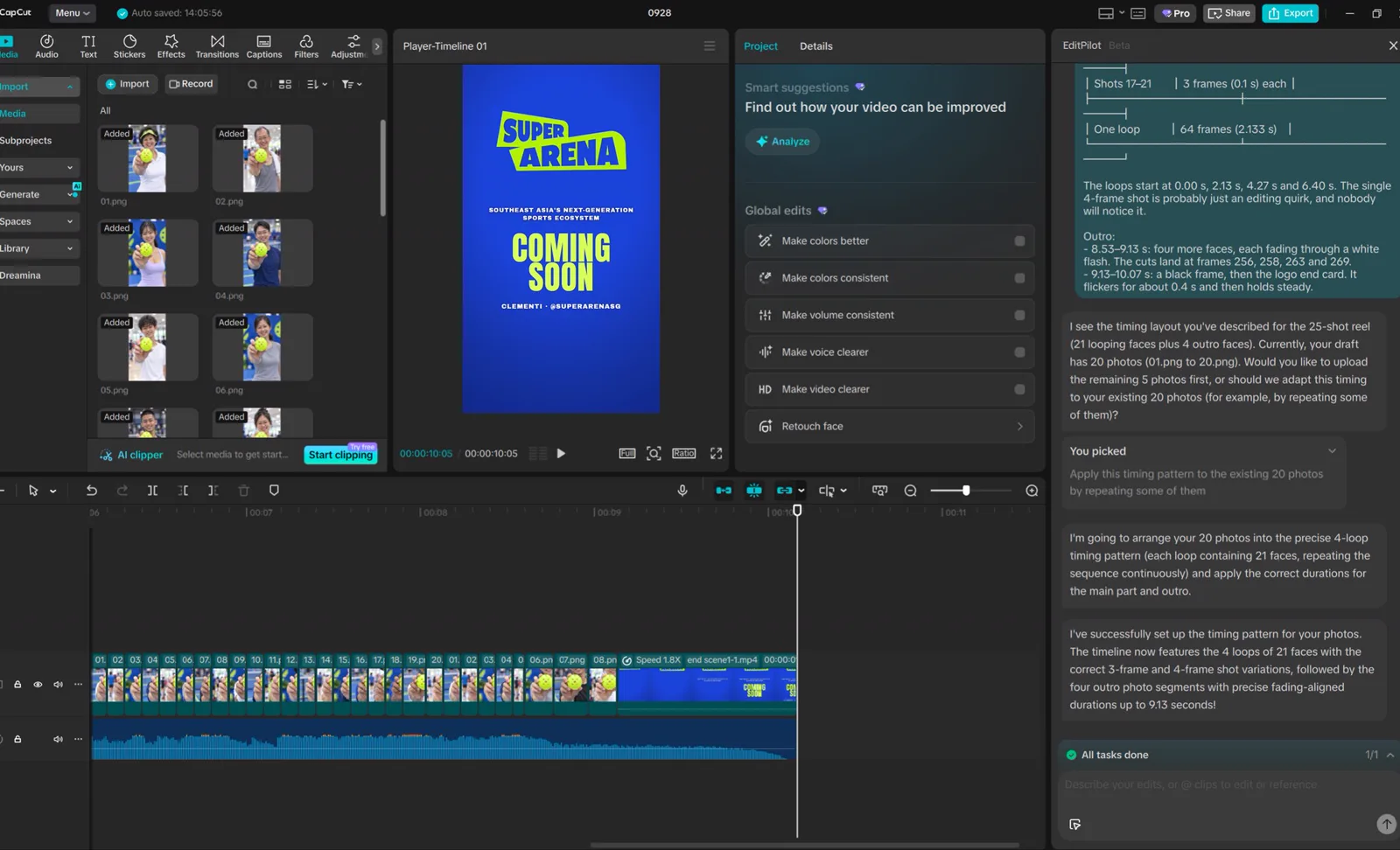
You can also paste the rhythm table from Step 1 and let EditPilot work the timing out itself. It will notice you have 20 photos where the reference had 21 and ask whether to add more or repeat some; pick repeating. If EditPilot isn't available, the manual version is short: drag all twenty photos onto the timeline, select them all and set the duration to 0.1 s, copy the block and paste it three more times, add three or four faces with a white flash transition between them, and drop the end card at the end.
The end card and the music
Our end card is 2.55 s of logo, tagline, "COMING SOON" and the handle. The reference's end card is about a second, so speed yours up (1.8× gave about 1.4 s) or trim it to start on the line that matters, and keep the full text on screen for at least half a second so people can read it.
The reference's soundtrack is someone else's licensed music. Use it as a guide track while you edit and nothing more; for the post, take a track with a similar fast beat from CapCut's commercial library or Instagram's business audio library, or a brand account's post can be muted or taken down. If the beat changes, the 0.1 s per photo changes with it.
Before you export
- Scrub frame by frame. The ball must not jump between cuts; if one does, fix that clip's position and scale.
- No transitions between the main photos. Hard cuts only.
- Every main photo clip is exactly 0.1 s; nothing got stretched when EditPilot rearranged it. The outro faces and the end card are the only longer clips.
- The end card text is readable.
- Export at 1080×1920, 30 fps, high bitrate.
Doing another version
The expensive part is solved once. Keep the fixed master, write a new cast list, run the batch (about 55 credits for twenty frames), check the ball sheet, and swap the frames into the same CapCut project. A kids-and-families version, a coaches version, or the real members of the venue photographed in the same pose all reuse everything above. For a real shoot, mark the ball's position on the camera screen and ask each person to hold it there.